Your Barrier Already Works: How to Automate an Existing Parking Barrier in 10 Minutes

An operator in Bologna called us last spring with a quote in his hand. Two lanes, entrance and exit, integrated ticketing, plate recognition, payment terminals, software licence. Twenty-two thousand euros, eight weeks lead time, and the car park would need to run on manual control for four days during commissioning.
His barriers were nine years old and working perfectly.

That is the part almost nobody says out loud in this industry. The barrier is rarely the problem. A parking barrier is a motor, a boom, and a control board, and it has one job it performs reliably for a decade or more. What it cannot do is know that someone booked lane one for 14:30 and paid in advance. It has no idea the internet exists.
You do not need to replace a machine because it lacks an opinion about the internet. You need to give it one.
The thing nobody tells you about your control board
Open the housing on your barrier and find the control board. Somewhere on it, almost certainly labelled with something like OPEN, START, CMD, or 2–3, there is a pair of terminals.
Those terminals are how the barrier already takes orders. Your handheld remote does not talk to the barrier in any sophisticated way. The receiver simply closes a circuit across those two terminals for a fraction of a second, and the boom lifts. Your loop detector does the same thing when a car sits over it. So does the intercom button in the lobby, and the key switch by the ramp.
This is called a dry contact, and it is the most boring, most universal, most useful interface in access control. It is not a protocol. It is two wires touching.

Manufacturers have been building it into barriers for decades because installers demanded it. Came, Nice, FAAC, BFT, Magnetic, Automatic Systems, Nedap, and dozens of regional brands all expose it. If your barrier can be opened by a remote, a key switch, or an intercom, it has one.
Which means the expensive question — how do I make my barrier smart? — has a cheap answer. You do not modify the barrier at all. You add one more thing that can close that circuit, and you make that thing internet-aware.
How to automate an existing parking barrier, step by step
A LetsParky Terminal is a small gateway device that does exactly this. Here is the whole procedure.
Step 1 — Mount it. The Terminal installs within thirty metres of the barrier. Inside the barrier housing, on a nearby wall, in the plant room. It does not need line of sight to anything.
Step 2 — Wire two conductors. Terminal relay output to barrier open input. Two wires. If you have ever wired a doorbell you are overqualified.
Step 3 — Give it power and WiFi. The Terminal draws mains power and connects to site internet over WiFi. This is the only site requirement worth checking in advance: the barrier location needs a usable signal.
Step 4 — Claim it in the app. Scan the QR code on the device. The barrier appears in your operator panel.
That is the install. In practice it runs about ten minutes for a technician who has done it once, and the barrier never stops working during the process — it keeps responding to the existing remotes and loops throughout, because you have added an input rather than replaced one.
What changes the moment it is connected
Before the retrofit, your barrier answers to whoever is holding a fob.
After it, your barrier answers to a rule set. And the rules are where the money is.
It opens for a reservation. A driver books a space for Thursday at 09:00, arrives, and the boom lifts without anyone doing anything. No code to text them, no attendant to call.
It opens for a plate. Add a plate recognition camera and the barrier lifts for known vehicles automatically — staff, residents, contracted monthly users — with no fob to lose and no card to clone.
It opens for a phone. Authorised users open it from the app, from anywhere. The building manager on holiday in another country can let a delivery in.
It stops opening when it should not. Access can be time-bounded. A contractor gets entry between 08:00 and 17:00 on weekdays and nothing else. A monthly permit expires the moment it is unpaid.
It keeps a record. Every lift is logged with a timestamp and an identity. When somebody claims they were never there, you know.
It takes money. The same event that opens the barrier can start a paid session and charge a stored card at exit.
None of this required a new barrier. The boom that lifts on Thursday morning is the same boom that lifted last Thursday.
The two objections worth answering
"Won't this void my maintenance contract?" A dry-contact input is a documented, manufacturer-intended interface. You are using the barrier exactly as designed — the same way the installer's own key switch uses it. Nothing is cut, drilled, or reprogrammed. If your service provider is uneasy, invite them to do the wiring; it is a ten-minute job they can invoice.
"What happens when the internet drops?" Existing controls are untouched, so remotes, loops, key switches, and the manual release all continue to work exactly as before. A retrofit adds a way in. It does not remove one. This is a meaningful difference from a rip-and-replace system, where a controller fault can leave you with no way to raise the boom at all.
The cost of leaving it as it is
Here is the uncomfortable framing.
Your barrier is currently a cost centre that produces no data. It consumes power, requires servicing, occasionally needs a boom replaced, and returns nothing measurable. Its only output is a piece of aluminium going up and down.
A connected barrier is an inventory system. It knows how many cars entered, when, how long they stayed, which ones paid, and which arrived without a booking. That information is the input to every pricing decision, every staffing decision, and every expansion decision you will make for the next five years.
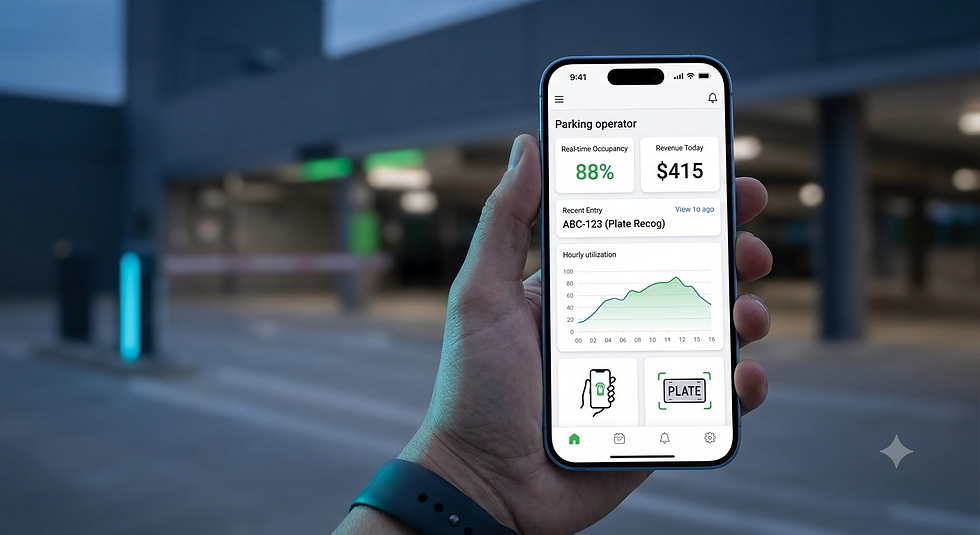
Operators who retrofit typically discover the same two things within the first month. First, their real utilisation is nothing like their assumed utilisation — usually much lower at the hours they staff most heavily. Second, there is demand at hours the car park has never been open.
You cannot act on either of those until the barrier starts talking.
What it costs
Item | Typical cost |
LetsParky Terminal (per lane) | ~$200 |
Installation | 10 minutes, or $100 – $200 with a technician |
Software, Basic plan (Bluetooth, up to 100 users) | Free |
Software, Professional plan (internet control, automated rental) | From $3 per device per month |
Enterprise API access | $5 per device per month |
Platform commission on rental revenue | 20% of collected revenue |
Optional plate recognition camera | ~$600 |
A single-lane retrofit with no camera comes in around $300 all-in, running at $36 a year. Compare that to the Bologna quote.
Frequently asked questions
Can any parking barrier be automated? Nearly all of them. If a barrier can be opened by a handheld remote, an intercom, a key switch, or an induction loop, it has a dry-contact open input and can accept a retrofit gateway. This covers essentially every commercially installed barrier from the last two decades regardless of manufacturer.
Do I need to replace my barrier to accept online parking reservations? No. The barrier provides physical movement; the reservation logic lives in the gateway and the platform. Adding a gateway to the existing open input is sufficient to make the barrier respond to bookings.
How long does it take to connect a barrier to the internet? About ten minutes for the physical install, plus a few minutes to claim the device in the operator app. The barrier remains operational throughout.
What if my barrier location has no WiFi? Site internet is the one genuine prerequisite. Options include extending the existing network with an outdoor access point, a powerline adapter from the nearest building, or a small cellular router at the barrier. This is usually the largest part of the job and still costs less than a barrier replacement.
Will existing remotes and fobs still work after the retrofit? Yes. A retrofit gateway is an additional input to the control board, not a replacement for the receiver. Every existing method of opening the barrier continues to function.
Next step: Barriers are only one kind of thing that opens with a relay. If your site also has bollards, roller shutters, sliding gates, or electrically locked doors, read If It Opens With a Relay, It Can Open With a Reservation.
